
Welcome
What this is
This is the knowledge base for the EMT platform — the system that runs Enviromet's sales pipeline, quotations and commission, end to end. One page, everything in it, searchable.
It has two jobs:
- Playbook — how the business process actually works, in the order you'll hit it: a lead comes in, it becomes a deal, a quotation goes out, the deal is won, money moves.
- Reference — every rule the system enforces, written down with a straight answer to "does the system actually stop me, or is this just how we're supposed to do it?"
Why this replaces DQS
The company has run its pipeline in a spreadsheet system called DQS. This CRM takes over that job. The commission engine, the approval routing and the deal rules that used to live in people's heads and in spreadsheet formulas are now enforced by the system itself — which means they apply the same way every time, to everyone, and they can't quietly drift.
Who this is for
Everyone who touches a deal, a quotation, a cost, or a commission — which by design is most of BD, Solutions, PMO, Finance and management. If you're not sure which parts apply to you, start with Start here, by role.
How to use this page
- Search. Type in the search box in the sidebar to jump straight to a section. Your browser's own Find (Ctrl+F or ⌘F) also works on this page — everything is real text, nothing is hidden behind a click to load.
- Every rule has a status. You'll see small coloured labels — LIVE, SCREEN, POLICY, PLANNED, GAP. That label is the honest answer to "will the system actually stop me." See How to read a rule — read that one section before anything else.
- Rule IDs are links. Anything written like
COM-14orWON-1is a stable reference you can point a colleague to — say "check COM-14" and they can search for it directly. Click one anywhere on the page and it jumps to that exact rule.
Getting help
This document explains what the system does and why. It does not replace asking a person.
- Something looks wrong, or you're blocked — ask your BD Director.
- A number doesn't match what you expect — check FAQ first; if it's still wrong, say so, don't guess past it.
- You think a rule is missing or wrong — say so. This page is corrected the same way the system is: by someone reporting it, not by someone assuming it'll get noticed.
Status of this document
Living document — it changes as the system does. See the Change log at the bottom for what's new. Last verified against the running system on 20 August 2026.
How to read a rule
Every rule in the reference sections carries a status. This is the single most useful thing on this whole page — it's the honest answer to "will the system actually stop me, or is this just how we're supposed to do it?"
LIVE The database enforces it. Break it and the system refuses, and tells you why. There's no screen that can work around it.
SCREEN A screen enforces it — a button is hidden, a field is required before you can continue. Real, for anyone using the CRM normally.
POLICY A rule we follow. Nothing checks it. If someone does it wrong, the system will accept it without complaint.
PLANNED Decided, and on record, but no code enforces it yet. Treat it as policy until it's built.
GAP A rule that ought to exist and doesn't yet. Listed so it's never mistaken for one that does.
Rule IDs — things written like COM-14 or WON-1 — are stable references. Use them when
you're discussing a rule with a colleague ("check COM-14") so you're both looking at the
same thing; click one anywhere on this page and it jumps straight there.
Start here, by role
Pick what you do. Each card is a short list of what matters most to you, linking straight to the detail.
BD Manager / BD Coordinator / BD Sales Engineer
You work leads and deals day to day.
- My work — what you'll see when you log in
- Submit and triage a lead
- Work a deal — filling gaps, scoring, moving stages
- Build a quotation
- Say who gets credit on a deal
BD Director
Everything above, plus the powers that keep the pipeline honest.
- Move any deal, not only your own
- Approve a commission — your seat on every deal up to RM 200,000
- Move a deal's role shares away from the default
- Settle a costing dispute
Solutions Manager
- Sign off a technical assessment
- Everything a BD role can do on a deal — scoring, quotations, credit — also applies to you
PMO
- Confirm a costing once Finance enters it
- Approve a quotation — PMO seat
- Open or settle a costing dispute
Finance
- Enter the actual cost of a won deal
- Pay a validated commission
- Close a clawback
CEO / COO / Chairman
- Approve above RM 200,000 — the COO's seat
- The one override — the Chairman's named power
- Settle a costing dispute
- Change a company setting — the threshold, the chance weights, the company default split
Everyone else (Employee)
- Submit a lead — the one thing every employee can do, whatever your role
What "My work" actually shows you
My work is the screen you land on, and it answers one question: what is waiting on me? It has two halves, and they are deliberately different.
Waiting on you
The top half is your inbox. Each band is a kind of work, and a band only appears when it has something in it — you will never be shown five empty headings. What can turn up:
| Band | What it means |
|---|---|
| Leads waiting on you | A submitted lead assigned to you to review. |
| Nobody has picked this up | An unclaimed lead your role may review. It isn't anyone's yet — pick it up and it becomes yours. Kept separate from your own queue on purpose, so yours and nobody's are never mixed under one heading. |
| Wins with nothing to prove them | A deal marked Won with no document recorded against it. |
| Commission awaiting your approval | A commission sitting in your seat. Above RM 200,000 there are two seats, so the same commission can sit in two people's inboxes at once — that is what the pair is for. |
| Clawbacks to settle | Money to be recovered, waiting on someone who may settle it. |
| Costings waiting on you | Finance enters the cost; the PMO confirms or disputes it. |
| Catalogue needs a look | Items flagged in the Product Master sheet — one row carrying the count, not one row per item. |
| Approvals waiting | Cost, price and margin changes from the quote portal, waiting on a decision. |
You are only ever shown a band you can actually act on. What is waiting on you and what you are allowed to do have to be the same question, or a row lands in an inbox belonging to somebody who cannot clear it.
⚠ The last two bands are silent at zero. Nothing flagged, nothing pending, and neither heading appears at all. That is why the quote portal's Approvals screen also keeps a standing door in the portal's own account menu — a row that can vanish is not a dependable way back to a screen.
Needs a look
The bottom half is the pile that is not waiting on one named person — Stalled · Incomplete · No costing · Waiting on PMO · Disputed · Lead waiting · Flagged · No owner · Portal stub · No final figures · No commission rate. Leadership sees this company-wide; everyone else sees what they own, plus anything unowned that their role covers.
Both halves empty is a real and good state, and the screen says so in words — "Nothing is waiting on you" — rather than looking like a page that failed to load.
"Assigned to you" is a different band, on the dashboard
⚠ Worth knowing, because the two are easy to confuse. The dashboard carries a band called Assigned to you. It was called "My work" too until 18 August 2026, and was renamed for exactly this reason: it could read "Nothing is assigned to you right now" next to a sidebar badge of 81, which looks like one number contradicting itself. Neither number was wrong — they count different things. The badge counts the My work screen, whose Needs a look half is company-wide for leadership; this band is scoped strictly to you. Its bands:
| Band | What's in it |
|---|---|
| Planned, and still to happen | Activities you planned for yourself that haven't happened yet. Overdue ones are marked, with how many days late. |
| Deals where I am PIC | Every open deal where you're the PIC, with its stage, value, and how long it's sat there. |
| Records to complete | Deals missing a required field, with the missing fields named rather than a general "something is missing". |
| Next actions | Deals where you're the PIC and a next action is logged with a due date. |
| Leads I submitted | Leads you submitted that are still open. |
| My commission | Commission lines with your name on them and a value above zero, with their status. |
These bands are whatever the system returns, in the order it returns them — a new one appears by being added at the source, not by being listed here, so this page is never the thing that decides how many there are.
The deal journey
The whole system in one story: how a deal is born, how it grows up, and how it turns into money. Every stage below links to the detailed rule behind it — this section is the map, not the fine print.
The five stages
A deal can also leave the pipeline as Lost or Dropped (on hold, no response, withdrawn, declined) at any point. Full mapping: LIFE — deal lifecycle.
1 · Someone brings in an enquiry
Anyone in the company — not just BD — can submit a lead. It needs the prospective organisation's name, and either a contact name (a direct enquiry) or a tender reference number (a tender). It lands in a queue with a BD Coordinator already assigned, so the triage clock always belongs to somebody.
2 · BD triages it
A BD Coordinator (or Manager, or Director) picks it up — claiming a lead nobody else holds — and decides: approve, reject, or put on hold.
- Reject needs a written reason of at least 10 characters — the submitter is told what it says.
- Hold needs a note and a review date.
- Approve is different from the other two: approving a lead creates the deal in the same step, asking for the four things a deal cannot exist without — see step 3.
3 · It becomes a deal
Approving a lead asks for three things you must give — they are marked with a * on the form — and two more you can leave for later:
| Field | ||
|---|---|---|
| * | Deal shortname | A short, recognisable name. Blank is now refused. |
| * | Client account | Whose deal it is. |
| * | Budget value | Must be above zero. |
| Revenue stream | Leave it on Not known yet if you don't know. | |
| How this deal originated | Can be set on the deal afterwards. |
The moment those exist, you have a deal — at the New stage.
⚠ Two of those used to behave differently, so it is worth saying plainly. Deal shortname was always described as required and nothing actually stopped you leaving it blank; it does now. Revenue stream used to arrive already filled with the first option in the list, as though somebody had chosen it — it now starts at Not known yet, so an unanswered question looks unanswered.
Everything else the deal is expected to hold is tracked as a gap — shown on the deal, never blocking your save. But gaps now do something they didn't before: filling them all is what moves the deal to Proposing. See step 5. Full list: Part 4 — what a deal must record.
The commission split is already decided in the background. The moment a deal exists, the system knows — from your role registry and the account's owner — who would get what share if this deal were won today. Nobody has typed a name yet, but the entitlement is already computed as a default. See Commission, explained.
4 · Qualifying — score it, know where it's headed
Score the deal on four inputs — how the enquiry arrived, its expansion potential, whether you can win on value, and its budget band. The score recommends a path: respond and release, fast-track, reframe, or the full solution path (tenders get their own four paths).
Getting here took nothing but touching the deal. The very first time anyone edits it — any field, however small — the deal moves itself from New to Qualifying. Nobody presses anything. That is what New means: nobody has started yet.
Scoring itself still doesn't move the stage. An Account Owner must now be on record; that's the field the system starts requiring from here.
5 · Proposing — the quotation gets built
Two different things can bring a deal here, and both happen on their own:
- You finish filling the deal in. The moment the last compulsory field is filled, the deal moves itself from Qualifying to Proposing. Ten fields have to be complete — Client account, Person in charge, Lead bringer, How this deal originated, Budget value (above zero), Chances, Revenue stream, Procurement type, Primary contact, and Account owner. Fill the tenth and the deal steps forward as you save.
- You save the first quotation. Open the quote portal, build the pricing, and save it — that also moves the deal to Proposing.
Either way you don't have to remember to update the stage by hand.
This is where margin and SST (Malaysia's Sales and Service Tax) get set — the portal defaults sensibly and warns you if you're pricing thin, but the decision to send a low-margin quote is always yours; nothing blocks it. See Quotation and pricing, in full.
6 · The quotation is sent and frozen
Once the client has actually received the quotation (it's been downloaded), it can be approved on two seats — BD and PMO — and then marked FINAL. A FINAL quotation is frozen: its price, cost and terms are what Finance and PMO will work from later, and both approvals must be dated after the last edit, so an edited quote always needs fresh sign-off.
Marking a quotation FINAL does two more things automatically: it writes the final total and cost onto the deal, and it nudges the deal forward to Submitted.
→ How to build and freeze a quotation · Freezing rules, in full
7 · The client decides — Won, or not
If the client says yes, the deal is marked Won — but only once five things are true: the final value, the costed profit and the closing date are all recorded, the client's own document (LOA, PO or equivalent) is on file and its figure matches the deal to the sen, and a commission split exists that adds up correctly. Miss any one and the system tells you exactly which, in plain sentences.
You no longer have to build the commission split before you can win. The system builds its default for you on the way to Won and stores it — the screen used to demand one first, which is why the Won button could not be pressed at all until 4 September 2026.
🛑 Winning freezes that split, and the freeze is the point worth remembering: it is the moment the money stops being editable by the PIC. From here only a recorded dispute can move it. Check the shares before you mark a deal Won, not after.
If the client says no, or goes quiet, the deal is marked Lost or one of the dropped states — and that's the end of the pipeline story for this deal. Nothing downstream fires.
8 · Won becomes money
Six handoffs, three different people, always in this order:
Nobody can skip a step, and nobody can approve their own split. Full walkthrough: How money moves from a win to a bank account · The full rules.
Who earns what, and when
The four commission roles are not job titles and they are not a committee. They are this same journey, priced — each share belongs to a different step above, and the same person often holds several of them on one deal.
| Step above | Role earned | Share | Where the system records it |
|---|---|---|---|
| 1 · the enquiry arrives | Lead bringer | 10% | The lead's submitter. A deal can have several, and they split the 10% equally. On a tender it is whoever spotted the notice and entered it. |
| 3 · it becomes a deal | Lead bringer becomes mandatory | — | The only commission role that can block a save — you cannot record a deal without naming one. |
| 4 · Qualifying | Account owner | 10% | Whoever owned the account when this deal started. It does not follow the account afterwards. |
| 5–6 · the quotation | Proposal team | 30% | Pinned by the quotation itself — the preparer is always in it. Who else joins depends on the size and complexity of the deal. |
| 7 · Won | Closer | 50% | Nothing on the deal record. It defaults to the PIC and is written only when the split is built. |
Read down the Share column and you have the shape of the business: bringing work in and owning a relationship are worth 10% each; building the proposal is worth 30%; getting to yes is worth half of everything.
⚠ The closer's 50% is a responsibility before it is a share. The PIC is expected to do whatever closing takes — and if the PIC needs help to close, the PIC should offer part of that 50% to whoever helps. Somebody who helped should not have to ask. That is also why the automatic default hands the PIC 80% (proposal and closer): it assumes the PIC did both, and correcting it is the PIC's job.
⚠ The roles are earned across the whole journey, but the split is only built at the very end, at the Won gate. The system has been computing a fair default the entire time the deal was open — and no screen shows it yet, which is why people still type in names the system already holds. See the gap this leaves.
Full rules: Part 8 — commission · how each role is meant to be held.
What the system does for you, automatically
You don't have to remember these — they just happen:
- The first edit of any kind moves a brand-new deal from New to Qualifying.
- Filling the last compulsory field moves it from Qualifying to Proposing.
- Your first saved quotation also nudges the deal to Proposing.
- Marking a quotation FINAL nudges the deal to Submitted, and writes its money onto the deal.
- A deal never moves backward on its own, and an automatic nudge never overrides a human decision — a deal you've marked Won, Lost, or put On hold stays exactly where you put it.
- A default commission split is computed the whole time the deal is open, and it is stored and frozen for you when you win — so winning a deal nobody split by hand produces a sensible, fair result instead of a blocked deal. (See the gap this leaves — it's real, but it isn't a dead end.)
How-to guides
Step-by-step, for the tasks people actually do. Each guide says who can do it and links to the rule behind every step.
Submit and triage a lead
Submitting — anyone in the company.
- Open the lead form. You'll need the prospective organisation's name, and either a contact name (a direct enquiry) or a tender reference (a tender enquiry) — one of the two is required depending on which kind it is.
- Fill in what you know — location, products of interest, how it arrived, notes, a follow-up action and date.
- Submit. It lands in the Leads queue, already assigned to a BD Coordinator, so nobody has to remember to look for it.
Triaging — BD Coordinator, BD Manager, BD Director, admin.
- On the Leads screen, pick up any lead nobody else is reviewing.
- Decide: approve, reject, or hold.
- Rejecting needs a written reason (10+ characters) — the submitter sees it.
- Holding needs a note and a date to come back to it.
- Approving is where a deal is actually born — see the next guide.
Rules: Group A capabilities · SCORE-1 for what happens if How this deal originated is left blank.
Approve a lead into a deal
Who: BD Coordinator, BD Manager, BD Director, admin.
- From the lead, choose Approve.
- Fill the form. Three fields are compulsory and carry a * beside the label: a short name for the deal, the client account (an existing one, or create a new one here), and a budget value above zero. Leave one blank and Approve is refused.
- Two more are offered and neither is compulsory: revenue stream, which starts at Not known yet, and How this deal originated. Both can be set on the deal later.
- Confirm. The lead is now a deal, at the New stage. The lead record stays linked to it — nothing is lost, the history carries over.
⚠ Don't leave the revenue stream on Not known yet for long — it decides the deal's commission rate later. It is optional here only so that an unanswered question looks unanswered rather than arriving pre-filled with whatever was first in the list.
⚠ The deal starts at New, and your very next edit moves it to Qualifying — see the deal journey. Nothing to press.
Rules: DATA-2, DATA-3 — the two fields that are hard requirements from this point on. COM-25 — the revenue stream decides the deal's commission rate later, so get it right rather than fast.
Work a deal — gaps, PIC, scoring
Who: whoever the deal is assigned to, plus BD Director/admin for anything wider.
- Check My work for anything waiting on you, then the dashboard's Assigned to you band for what is simply yours — your own planned activities, deals you're the PIC on, records still to complete, next actions due, your open leads and your commission lines. Those two are the lists to work from, not a full browse of everything. (What each one shows, exactly.)
- Fill the gaps. A deal shows every field it's missing for its current stage — client account, PIC, lead bringer, budget, chances, revenue stream, and more as it advances. None of these (besides budget and lead bringer) block you from saving; all of them block the deal from being properly counted until they're filled.
- Set the PIC (Person In Charge) if it isn't set. A deal with no PIC belongs to nobody's My work — it's invisible to everyone until someone claims it.
- Score it once you have enough information — how this deal originated, expansion potential, win-on-value, and the budget band together produce a path recommendation. Re-scoring never overwrites the old score; every version is kept.
Rules: Part 4 — required fields, in full · Part 5 — scoring · my_work, exactly what it shows.
Build, approve and freeze a quotation
Who: any BD role, Solutions Manager, admin can build one. Approving needs the BD or PMO seat specifically (see step 8).
- In the CRM sidebar, under Quotations, open All quotes — then + New quotation on that screen. There is no "New Quote" item in the sidebar: you always go through the register, which is also where you reopen anything you've already built.
- A new quotation opens on its Configuration tab, at Client & deal. Start by picking the deal. That fills in the client name and the quote title for you, and leaves alone anything you've already typed — it never overwrites your own words, and it tells you which of the two it did. Prepared By fills itself in: it's whoever is signed in, shown read-only, and recorded when you save.
- Work across the Configuration sub-tabs as the quotation needs them — Client & deal · Solution · Locations & clusters · Station types · Indirect costs · Payment schedule. Set-up comes first on purpose: the tab order is the order the work wants doing in.
- Move to the Lines tab and price it. Margin is measured on price, not on cost —
a 30% margin means the price is
cost ÷ 0.70. The portal starts pools at 30% by default. Every band — section, sub-section, place or station type — states its own cost and GP% next to its total, like9 lines · RM 49,925.97 · cost RM 32,843.39 · GP 34.2%, so you can see where the margin actually sits without leaving the table. A band with nothing priced in it shows a dash, never0.0%— "this band makes no margin" and "nothing here is priced yet" are different sentences. - Below-floor pricing is a warning, never a block. Quote under 30% overall (or under the catalogue's own minimum price), or price a single ad-hoc line under 20% margin, and the portal flags it and writes it to the Quote Log — but you can still send it. That's deliberate: the pricing call is yours, the record is the company's.
- Check Client Name and Project Reference are filled — those two are required before you can download. Leave either empty and the portal takes you back to Configuration → Client & deal with the missing one highlighted.
- Download it — this is what "the client has received it" means to the system.
- Get it approved on both seats — BD and PMO. Both approvals must be dated after the quotation's last edit, so if you change anything after an approval, both seats need to sign again.
- Mark it FINAL. This freezes it, writes its total and cost onto the deal, and automatically nudges the deal to Submitted.
⚠ A deal can only have one FINAL quotation at a time. If you need to replace it, an administrator has to unfreeze the old one first — with a reason on record — before a new one can take its place.
Rules: Part 6 — quotation and pricing, in full · Part 6 — freezing, in full.
Say who gets credit — the commission split
Who builds it: the Deal PIC, by default. Changing someone else's split, or a frozen one, needs the BD Director, CEO, COO or admin.
- On the deal, open the commission split panel.
- Divide each of the four roles — Lead bringer (10%), Account owner (10%), Proposal team (30%), Closer (50%) — among the people who did that work. Within a role, the people must add up to exactly that role's share, or leave the role empty entirely (its share then stays with the company — that's a valid, honest outcome, not an error).
- Two roles are non-negotiable: a Lead bringer and an Account owner must both appear somewhere on the split.
- The Proposal team can never be empty — and if a quotation on this deal has a resolved preparer (someone linked to it, not just typed in), that person must be somewhere on the proposal team.
If you never touch this panel, nothing is lost — the system has been quietly computing a sensible default the whole time the deal has been open (lead bringers split their 10% evenly; the account owner gets their 10%; the PIC gets the proposal and closer shares, minus 15% to a non-PIC quote preparer if there is one). That default is what gets stored if the deal is won with no split ever built.
Rules: Part 8 — commission, in full — read COM-1 through COM-12 for the shape of it before touching a real split.
Mark a deal Won
Who: the Deal PIC, or BD Director/admin for someone else's deal.
Before the system will let you, all five of these must already be true:
- Final TCV (total contract value) is recorded, above zero.
- Costed GP (gross profit) is recorded.
- The closing date is recorded.
- The client's own document — LOA, PO or contract — is on file, and its figure matches the deal to the sen.
- A commission split exists and adds up correctly. You do not have to build one first — if you skipped it, the system builds and stores its own default on the way to Won.
If anything's missing, the refusal lists everything that's still needed at once, in plain sentences — not one item at a time.
Once it's Won, the split freezes — and that is the moment the money stops being editable by the PIC. Changing it after this point needs a recorded dispute, not a normal edit, so check the shares before you mark a deal Won, not after.
Rules: Part 7 — winning a deal, in full.
From Won to a bank account
Six steps, three people, always in this order — nobody can skip one.
- Finance enters the actual cost of the won deal. (Finance only; only works on a deal that's already Won.)
- PMO confirms the cost is final. This is what turns the commission from provisional to calculable — confirming it triggers the calculation itself.
- The commission calculates itself. Nobody does this by hand; it runs the moment PMO confirms.
- Approve it — the BD Director alone, up to RM 200,000; the BD Director and the COO together above it. Nobody can approve a split they're personally on.
- Validate it — turns the calculation into a real entitlement. Needs the client document on file, a final (not provisional) costing, and no leaver review still open.
- Finance pays it. Twice a year: anything validated Jan–Jun pays in the July cycle; anything validated Jul–Dec pays the following January.
If a cost is disputed at any point, raising the dispute stops step 2 until it's settled by the BD Director, CEO, COO or Chairman.
Rules: Part 9 — the full money chain.
Raise or settle a costing dispute
Raising it — BD Director, BD Manager, BD Coordinator, PMO, admin. Add a note saying what's contested. This immediately stops the costing from being confirmed until it's resolved.
Settling it — BD Director, CEO, COO, Chairman, admin. Decide the figure, with a written reason of at least 10 characters — it's the only record of why that number won. This writes the decided cost onto the deal and re-runs the commission calculation.
Rules: MON-5, MON-6.
The quotation table, in detail
This section is a reference for the Lines tab of a quotation — every icon, badge, colour and notice you'll see there, and what each one is telling you. It's a companion to Build, approve and freeze a quotation, which covers the process; this page covers the screen itself.
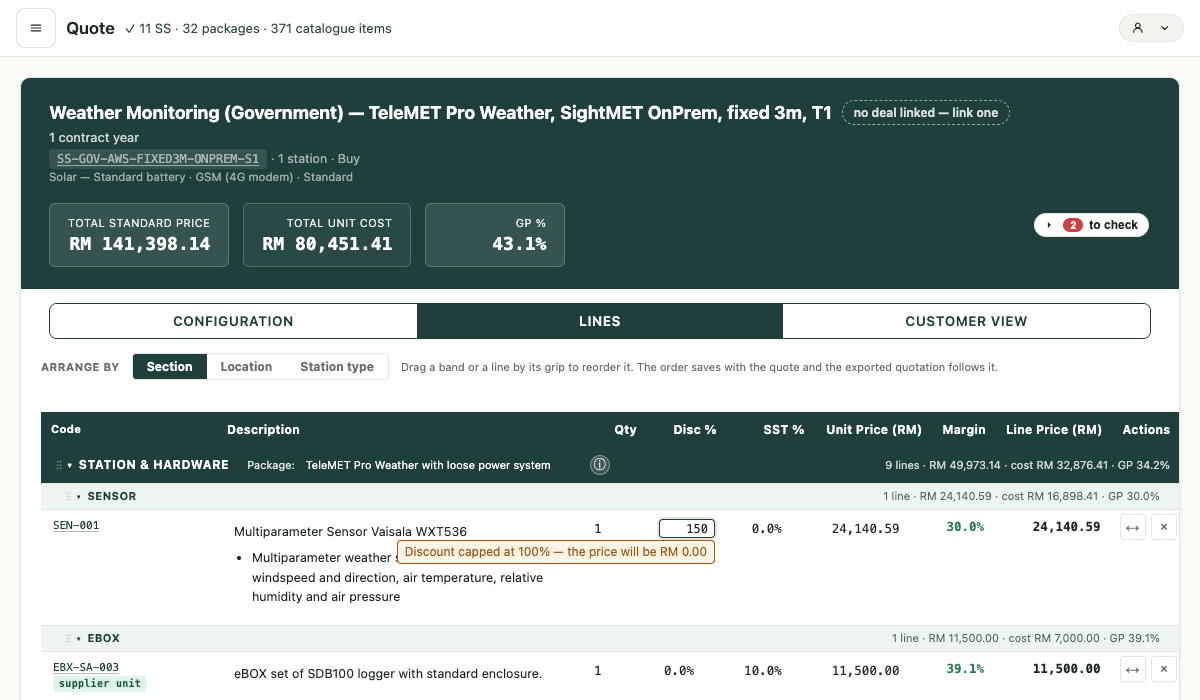
Arranging the table
Three buttons above the table — Section · Location · Station type — show the same lines
grouped three different ways. Nothing about the lines themselves changes; only how they're
bucketed. Section is the everyday view (Station & Hardware, Software, Service, …); Location groups
by cluster when a quote spans more than one site; Station type is useful once a quote mixes more
than one kind of station. Every band, in every grouping, states its own cost and margin next
to its total — 9 lines · RM 49,973.14 · cost RM 32,876.41 · GP 34.2% — so you can see where the
margin actually sits without leaving the table.
Clicking a field
Every field on this table is plain text until you click it. That's deliberate — a table of live edit boxes is hard to read; a table of text with one editor that opens where you click is not. Hover or Tab to any field and a small pencil icon appears — that's the cue it's editable.
Two kinds of field, two kinds of editor:
- Place and Package open a dropdown picker — the same combobox control used everywhere else in the system. Pick an option, or type to search a long list.
- Qty, Disc %, SST % and Unit price open a small number box, sized to sit exactly over the figure so nothing jumps.
The same keys work in both:
| Key | What it does |
|---|---|
| Enter | Saves, and moves down to the same field on the next line. |
| Tab / Shift+Tab | Saves, and moves right / left to the next field. |
| Escape | Cancels — puts the field back exactly as it was, nothing saved. |
| Click elsewhere | Saves, and whatever you clicked on still does its own job — opens another field, folds a section, removes the line. |
| ⌘Z (undo) | Undoes what you've just typed — but only while the box is still open. Once you press Enter and it's saved, there's no undo for that edit; you'd reopen the field and retype the right value. |
Typing the exact same value that's already shown and pressing Enter writes nothing at all — the line isn't marked as changed, because nothing actually changed.
The note under an open money box previews what saving will do, before you save. In the
screenshot above, typing 150 into Disc % shows "Discount capped at 100% — the price will be RM
0.00" — the box tells you the outcome before you commit to it. You'll see this on every field
that has something worth saying: a discount over 100%, an SST over the 30% cap, a price below the
line's minimum, a blank box, or a line whose price is locked for a reason (as-quoted, held, an
ad-hoc price typed by hand, a carrier line, a line split across two trips) — the note names which
one, in each case.
Every icon on the table
| Icon | Meaning |
|---|---|
| ✎ (pencil) | Appears on hover/focus over any editable field. Click to open its editor. |
| ⋮⋮ (drag grip) | Drag a section band or a line by it to reorder. The order saves with the quote, and the exported quotation follows it. |
| ▾ (chevron) | Folds or unfolds a section or sub-section band. |
| ⓘ (circle-i) | Sits beside a Package field — click for that package's full detail. |
| ↔ | Swap item — replace this catalogue item with another of the same kind. |
| × | Remove line — deletes the line from the quote. |
| A badge shaped like a small chevron button, on a manufactured or supplier item | Click to see what's inside that sub-assembly — its own breakdown row opens directly underneath. |
Every badge
A badge is a small pill of text sitting right after a line's item code — a line can carry more
than one at once. These are rendered here with the platform's own exact colours — not a
description of them — read straight from assets/css/styles.css, in both themes. Where a badge
looks the same in both, it's shown once. Every badge the Lines table uses is in this table —
nothing left out.
Four of these — ad-hoc, source, edit, propose — appear together, in that order, only on an ad-hoc line (an item typed in by hand, not picked from the catalogue):
| Badge | Light | Dark | Meaning |
|---|---|---|---|
ad-hoc |
ad-hoc #6B21A8 — identical in both themes |
Marks the line as not in the catalogue — typed by hand, priced on this quote only. | |
source ↗ |
source ↗ | source ↗ | A link to where the price came from (internal — the client never sees it). Present only when a source link was given. |
source missing |
source missing | source missing | No source link yet — required before this quote can be downloaded. |
edit |
edit | edit | Opens this ad-hoc item's own form to change it. Plain by default; the border and text turn green on hover. |
propose ⤴ |
propose ⤴ | propose ⤴ | Proposes this hand-typed item for the real catalogue — lands PENDING for Shaf's approval. Same plain/hover styling as edit. |
The rest can appear on any line, ad-hoc or not:
| Badge | Light | Dark | Meaning |
|---|---|---|---|
custom |
custom #548235 — identical in both themes |
An added line — not drawn from the catalogue's standard configuration for this package. | |
mod |
mod #FFF4E5 |
mod #3A2E19 |
A standard catalogue line whose Qty, Unit price or SST % has been changed from its standard value. |
| a trip's name e.g. Pahang |
Pahang | Pahang | On a package line split across more than one trip, names which trip's share this row is (only in the Section and Station-type views — the Location view already groups by trip, so it would repeat what the band above already says). Deliberately not an uppercase colour pill like the badges above it — a dashed, sentence-case name, because it's a fact, not a state. |
Monthly |
Monthly #2563EB — identical in both themes |
On a rental quote, every priced line (that isn't already "included in rental rate") carries one of these three — click to switch how it bills. A green ring appears around any of the three when you've overridden the line's own default. | |
One-time |
One-time #6B21A8 — identical in both themes |
||
At end |
At end #6B7280 — identical in both themes |
||
check price |
check price #fff0d2 — hard-set, not a theme token: it does not change in dark mode |
The catalogue flags this item's supplier price as due for a check before you finalize — hover it for the reminder. The line's whole row also tints the same amber (see Row colours, below). | |
Optional |
Optional | Optional | Sits beside an optional line whose Qty is currently 0 — with the note "qty 0 — not charged. Edit qty to activate." right beside it. Same amber as mod. |
The sub-assembly indicator (the chevron badge on a manufactured or supplier item, from the icon
table above) isn't one fixed colour — it reads its state, the same way a mod/custom badge does,
but with three states instead of two:
3 parts matched/supplied — everything this sub-assembly needs is accounted for · drifted the catalogue changed under it since it was last checked · type? unclassified — click it to say what kind it is
(dark mode: 3 parts · drifted · type?)
A line drawn from a supplier's own package (an eBOX-type item) shows "supplier unit" as this badge's text once it's matched — the colour is the same green "matched" state above, the label is just naming what kind of unit it matched to.
⚠ "Shared", "Trip 1", "Project-wide" are not badges — that's the Place field itself, sitting right after these badges on an added line, styled as its own bordered box rather than a colour pill (a place is a fact you read, not a state, the same reasoning as the trip name above). See Clicking a field for how it opens and what the keys do.
Row colours
Same principle — these are the table's own real backgrounds and edge-stripes, read from the CSS, not approximated.
| Row looks like… | Light | Dark | Meaning |
|---|---|---|---|
| Warm background, stripe down the left edge | Modified — this line's Qty, Unit price or SST % differs from standard (same trigger as the mod badge). |
||
| Softer highlighted background, stripe down the left edge | Custom — an added line (same trigger as the custom badge). |
||
| Warm background, no stripe | same amber as Modified, but no edge stripe | Supplier price due a check — same trigger as the check price badge; can land on top of any of the other row states above. |
|
| Warm background, stripe, muted italic text | Optional, currently zero qty — same trigger and colours as Modified, with the Optional badge and its hint text beside the Qty. |
||
| Pale teal, italic text | same in both themes — this row doesn't yet have its own dark styling | Optional line (a quote's own Optional/Alternative-type item) that isn't zero-qty, custom or modified. | |
| Pale grey, italic text, no money fields shown | same in both themes — this row doesn't yet have its own dark styling | Included in rental rate — this line's cost already sits inside the rental price; there's nothing separate to edit here. | |
| Plain, no highlight | the page's ordinary row background | An ordinary catalogue line at its standard configuration — nothing to flag. | |
⚠ A row can carry the price-check tint on top of another state (modified-and-price-check, for instance) — the states above aren't always mutually exclusive; where they overlap, the table shows each state on its own so you can recognise the parts.
Marks inside a money field
Beyond the row's own colour, each of the four money fields can carry its own small mark, shown in the close-up below:
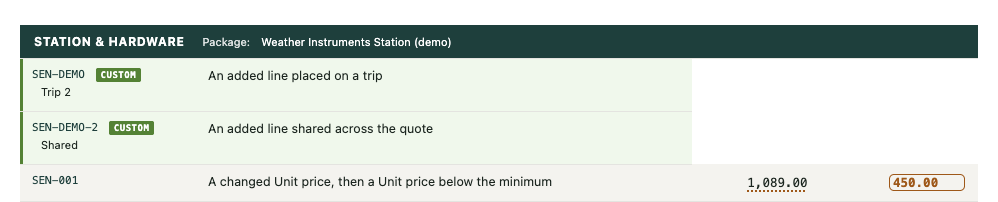
- A dotted amber underline under a value (
1,089.00above) — this field was changed from its standard value. It's the field-level version of themodbadge and the amber row — you'll see it on a Qty, Disc %, SST % or Unit price that no longer matches standard, even on a line that isn't otherwise highlighted (a custom line, for instance, marks its own changed fields the same way). - A solid amber box around a value (
450.00above) — the Unit price is below the catalogue's approved minimum. This is a warning, not a block — the portal flags it and writes it to the Quote Log, but you can still send the quote; the pricing call is yours, the record is the company's (see below-floor pricing, in the how-to).
Both marks read the same way in dark mode — the colours are chosen to hold their meaning and their contrast in both themes, not just the one you happen to be looking at.
Notices above the table
Two kinds of message sit above the Lines table, in the quote's own header:
- An amber warning banner, when it applies — "Check latest supplier price before
finalizing — 3 items: PWR-021, PWR-012, PWR-002" — names every item on the quote whose
supplier price is due a check (the same trigger as the
check pricebadge on those lines). - An informational line — "Exchange rates applied: EURO 4.9543 (as loaded 14 Sept 2026, 12:19 am — rates are live in the workbench)" — tells you which foreign-currency rates priced the quote, and when they were last loaded.
- A one-line transient notice, right under the header, that appears only when something about an edit needs saying — for example, if the line you were editing was removed from the table by someone or something else before you saved, it says so by name: "Your change to Qty on SEN-001 was not saved — that line is no longer on the table." It clears itself once you've seen it.
Rules: Part 6 — quotation and pricing, in full.
Commission, explained with real numbers
The rules in the reference section are precise on purpose, but precise isn't the same as easy to picture. This section walks one deal through the whole engine so the numbers actually mean something.
The shape of it, in one sentence
Every deal splits its commission four ways — Lead bringer, Account owner, Proposal team, Closer — and the rate that commission is paid at depends on how profitable the deal was, not just how big it was.
A worked example
Say a Trading deal closes at RM 200,000 total contract value, with a costed gross profit of RM 80,000 — a margin of 40%.
Step 1 — find the rate. Trading deals at 40% margin or above pay 3%, calculated on the gross profit (not the full contract value):
RM 80,000 × 3% = RM 2,400 — this is the whole commission pool for this deal.
Step 2 — split it by role, using the company's default shares unless this deal's PIC built a custom split:
| Role | Share | Of RM 2,400 |
|---|---|---|
| Lead bringer | 10% | RM 240 |
| Account owner | 10% | RM 240 |
| Proposal team | 30% | RM 720 |
| Closer | 50% | RM 1,200 |
Step 3 — find the people. Say one person — the Deal PIC — did the proposal and the close alone, with someone else as lead bringer and a third person as account owner. The PIC's two roles combine: RM 720 + RM 1,200 = RM 1,920 to them.
Step 4 — check the cap. Every person has a maximum they can earn from one deal, set by their staff level (RM 5,000 for a Junior up to RM 50,000 for Management). RM 1,920 is well under any level's cap, so nothing lapses here. If it had been over, the extra would simply be lost — never handed to someone else.
Step 5 — approve it. RM 2,400 is under the RM 200,000 threshold, so the BD Director alone signs it off. A deal with a commission pool over RM 200,000 needs the COO as well.
That's the whole mechanism. Every commission on the platform is this same five-step calculation — only the rate, the people and the numbers change.
What happens when a role is left empty
If nobody is named as, say, the account owner, that role's RM 240 doesn't get redistributed to anyone else — it stays with the company, and the calculation says so in plain words: "RM 240 of this commission stays with the company: no one holds these roles — account owner." An empty role is a real, honest outcome, never a silent error.
Why the rate isn't fixed
The rate table rewards profitable deals, not just big ones — the same RM 200,000 deal pays nothing at all if its margin is under 30%, because chasing revenue at a loss shouldn't be worth the same as chasing it well. See the full rate table: COM-25.
Who can see what
You can always see your own commission — your lines, your share of any split you're on. Other people's commission amounts are visible only to the BD Director, COO, CEO, Finance and admin — everyone else on a split can see who is on it and for what percentage, which is the thing they actually have to negotiate, but not what anyone was actually paid. Full detail: Part 11 — who can see what.
The one thing worth remembering
A default split exists from the moment a deal is created — you don't have to build one by hand for the system to know a sensible answer, and when you mark the deal Won the system stores that default and freezes it for you. But nothing shows you the default on screen before that, so most people still type in names it already holds. That's a known gap, not a secret: TODO-1.
🛑 Which is why the freeze is worth one more sentence: it is the moment the money stops being editable by the PIC. If the default is not what you intend, change it before the deal is marked Won.
Part 1 — Who is who
The CRM knows thirteen roles. Every person has exactly one. The role decides what they may do and what they may see.
| Role | Title | Uses the CRM? | Counts as "top management"? | Counts as "BD team"? |
|---|---|---|---|---|
chairman |
Executive Chairman | Yes | Yes | Yes |
ceo |
Chief Executive Officer | Yes | Yes | No |
coo |
Chief Operation Officer | Yes | Yes | No |
bd_director |
BD Director | Yes | Yes | Yes |
bdm |
BD Manager | Yes | No | Yes |
bd_coord |
BD Coordinator | Yes | No | Yes |
bd_se |
BD Sales Engineer | Yes | No | Yes |
solutions_mgr |
Solutions Manager | Yes | No | Yes |
pmo |
PMO | Yes | No | No |
pm |
Project Manager | Yes | No | No |
finance |
Finance | Yes | No | No |
admin |
Platform Administrator | Yes | No | No |
staff |
Employee | No | No | No |
ROLE-1 · An ordinary employee may submit a lead and see their own leads — nothing else. LIVE They cannot open the CRM. This is what lets the whole company send in an enquiry without anyone seeing the pipeline, the margins or the commissions.
ROLE-2 · "Top management" and "BD team" are groupings the rules refer to, not job titles. LIVE Several rules below say "any of the BD team" rather than listing five roles. The table above is the definition, and it lives in the database — change it there, not in prose.
ROLE-3 · The Executive Chairman inherits everything the BD Director can do. LIVE He does not need a separate grant for each BD power.
ROLE-4 · The Executive Chairman is deliberately NOT an approver on the RM 200,000 commission
route. LIVE That route is the COO and the BD Director (see COM-14). The Chairman holds a
separate, named override instead (COM-16) so that when he does step in, it is recorded as an
override and never disguised as an ordinary two-person approval.
ROLE-5 · admin is a system function, not a position in the company. LIVE
It exists so the platform can be maintained. It is not a seniority level and should not be given
to someone because they are senior.
ROLE-6 · The Project Manager role has no visibility rules yet. GAP — important.
A pm counts as a CRM user, so anyone given a Project Manager login today would be able to read
every quote, cost, margin and commission on the platform. Four active Project Managers hold this
role and none of them has a login, so nobody is exposed. Do not issue a Project Manager login
until the visibility rules are built.
Part 2 — What each role may do
The system holds a register of capabilities — named powers, each granted to a list of roles. This is not a general "permission" idea: each capability is one specific act, and each carries a written note saying what goes wrong if the wrong person does it. That note is why the power is restricted, and it is stored next to the grant.
AUTH-1 · A power is held by a ROLE, not by a person. LIVE
Change someone's role and their powers change with it. There is exactly one exception, COM-16.
AUTH-2 · The power to change who may do what cannot itself be granted to anybody. LIVE
grant_capability has no role holders at all. Changing the register is a deliberate act performed
directly on the database, not something any login can do.
AUTH-3 · Every grant and every removal is recorded with a written reason, and the record cannot be edited afterwards. LIVE
The register is grouped by how much damage the wrong hands could do.
Group A — leads (visible, recoverable, no money moves)
| Power | Who holds it |
|---|---|
| Pick up an unclaimed lead | BD Director, BD Manager, BD Coordinator, admin |
| Decide a lead — reject or hold | all BD roles, CEO, COO, Solutions Manager, admin |
| Approve a lead and turn it into a deal | BD Director, BD Manager, BD Coordinator, admin |
| Turn an approved lead into a deal | all BD roles, CEO, Solutions Manager, admin |
| Reopen a rejected or held lead | BD Director, BD Manager, BD Coordinator |
| Hand a lead to somebody else | BD Director, BD Manager, BD Coordinator, CEO, COO, admin |
| Ask the submitter for more information | BD Director, BD Manager, BD Coordinator, CEO, COO, admin |
Group B — deals, accounts and quotations (real consequences, still reversible)
| Power | Who holds it |
|---|---|
| Move any deal to another stage — not only your own | BD Director, admin |
| Edit a deal's details | all BD roles, Solutions Manager, admin |
| Change who a deal belongs to (the PIC) | BD Director, CEO, admin |
| Record an activity on somebody else's behalf | BD Director, BD Coordinator, admin |
| Score and re-score a deal | all BD roles, Solutions Manager, admin |
| Say who brought a deal in (lead bringer) | all BD roles, Solutions Manager, admin |
| Say who closed a deal | all BD roles, Solutions Manager, admin |
| Record the validated value of a win | BD Director, BD Manager, BD Coordinator, admin |
| Bring a new client into the system | all BD roles, Solutions Manager, admin |
| Assign the owner of a client account | BD Director, CEO, COO, admin |
| Add, change, remove a client contact | all BD roles, Solutions Manager, admin |
| Sign off a technical assessment | BD Director, Solutions Manager, admin |
| Change the company default commission shares | CEO, Chairman, admin |
| Mark a quotation FINAL | all BD roles, Solutions Manager, admin |
| Approve a final quotation — BD seat | BD Director, admin |
| Approve a final quotation — PMO seat | PMO, Chairman, admin |
| Join a quote to its real deal | BD Director, BD Coordinator, admin |
| Create a deal from the quote portal | admin only |
AUTH-4 · Saying who brought a deal in, and who closed it, is a money decision. LIVE Both sit in this group because commission follows credit. Six roles can do it, which is deliberate — the person who knows is usually not the director — but every change is on the record.
Group C — money
| Power | Who holds it |
|---|---|
| Enter the actual cost of a won deal | Finance, admin |
| Confirm that cost is final | PMO, admin |
| Open a disagreement about a cost | BD Director, BD Manager, BD Coordinator, PMO, admin |
| Settle a disagreement about a cost | BD Director, CEO, COO, Chairman, admin |
| Change a commission split you did not build, or one that is frozen | BD Director, CEO, COO, admin |
| Move a deal's role shares off the company default | BD Director, admin |
| Turn a commission calculation into an entitlement | BD Director, CEO, COO, admin |
| Approve a commission outside the normal routing | CEO, and Shaf by name (see COM-16) |
| Take a commission entitlement back | BD Director, CEO, COO, admin |
| Pay people | Finance, admin |
| Close a debt owed back to the company | Finance, admin |
| Change a company setting (incl. the RM 200,000 threshold) | BD Director, CEO, admin |
| Change how a deal stage is weighted | BD Director, CEO, admin |
| Confirm a person's staff level (= their commission cap) | BD Director, CEO, admin |
| Change what commission is calculated on | CEO, Chairman, admin |
| Unfreeze a FINAL quotation | admin only |
AUTH-5 · Finance enters cost and pays; PMO confirms cost. Neither can do the other's job. LIVE This is the separation the whole money chain rests on (Part 9).
Part 3 — The deal lifecycle
A deal has a workflow state — the detailed status a person sets — and a stage, which is the coarse grouping the pipeline board draws. The system maps one to the other; nobody maintains two lists by hand.
| Stage | Counts as open? | Workflow states that map to it |
|---|---|---|
| New | Yes | new, contacted |
| Qualifying | Yes | scoring |
| Proposing | Yes | proposal_in_progress |
| Submitted | Yes | proposal_sent, awaiting_decision, negotiating |
| Won | No | won |
| Lost | No | lost |
| Dropped | No | on_hold, no_response, withdrawn, declined |
| Unclassified | Yes | (anything not yet mapped) |
⚠ The first stage was called Lead until 4 September 2026 and is now called New. Only
the label changed — the underlying code is still lead, so anything technical that refers to
it still reads lead. New and Qualifying are also separate columns on the pipeline
board now, where they used to share one: New means nobody has started, and a deal leaves it
the first time anyone edits it.
LIFE-1 · The Deal PIC may always move their own deal. Moving somebody else's is a separate power. LIVE Held by the BD Director and admin. The refusal message names the PIC and names who may move it, so nobody has to guess who to ask.
LIFE-2 · A deal cannot be moved to a state that is not on the list, and cannot be moved to the state it is already in. LIVE
LIFE-3 · The system nudges a deal forward on its own when a document says so. LIVE Saving the first quotation on a deal moves it to proposal in progress; marking a quotation FINAL moves it to proposal sent. This is bookkeeping catching up with reality, not a decision.
LIFE-4 · An automatic nudge only ever moves a deal FORWARD, and never past a human decision. LIVE A deal that is Won, Lost, On hold, Withdrawn, Declined or No response is never touched by a nudge. A nudge never moves a deal backwards. (Shaf's rule, 20 August 2026 — explicit human choices are never overridden by bookkeeping.)
LIFE-5 · A stage nudge can never break a save. LIVE If the nudge cannot be applied, the quotation still saves and the failure is logged. You will never lose work because the pipeline could not update.
LIFE-6 · A deal is "stalled" after 21 days with no movement. SCREEN It is then drawn in the needs a look band. This is a prompt, not a penalty.
Part 4 — What a deal must record, and by when
The system keeps a list of fields a deal is expected to hold, each with the stage it becomes expected from, and a written reason why it matters. A missing field is drawn as a gap on the deal — it does not block you from working.
| Field | Expected from | Why it matters |
|---|---|---|
| Client account | Unclassified | Nothing can be owned, quoted or commissioned until we know whose deal it is. |
| Person in charge (PIC) | Unclassified | A deal with no PIC is nobody's job and appears in nobody's My work. |
| Lead bringer | Unclassified | Commission cannot be split, and nobody gets credit, until it is recorded. |
| How this deal originated | Unclassified | Feeds the score. Missing, it scores 0 — the deal reads worse than it is. (Called Enquiry source before 4 Sept 2026.) |
| Budget value | Unclassified | Feeds the value score and the weighted pipeline. Missing, the deal is drawn as RM 0. |
| Chances | Unclassified | The weighting on every pipeline figure the Chairman reads. |
| Revenue stream | Unclassified | How the deal is classified in every report — and it decides the commission rate. |
| Procurement type | Unclassified | Decides whether tender guidance applies. |
| Primary contact | Unclassified | You do not propose to a company, you propose to a person. |
| EMT product fit | Proposing | Decides whether the deal is escalated as outside our domain before presales money is spent. |
| Product category | Proposing | Classification for the catalogue and the scorecard. |
| Proposal folder | Proposing | Where this deal's documents live. Without the link nobody else can find what was sent. |
| Account owner | Qualifying | Drives the owner cascade and therefore the commission split. It is a point-in-time value — see the note below. |
⚠ The Account owner on a DEAL is who owned the account when that deal started, and it does not follow the account afterwards. (Shaf, 26 August 2026.) Nothing cascades a later change in the account's owner onto deals already in flight, and that is deliberate: the 10% belongs to whoever held the relationship while the deal was being worked, not to whoever holds it today. So a deal showing a different owner from its account is normally correct history, not an error.
DATA-1 · Most missing fields are SHOWN, not enforced. SCREEN
You can work a deal with gaps. What you cannot do is win it with gaps that affect money (Part 7).
Two fields are the exception and are refused outright — see DATA-2 and DATA-3.
DATA-2 · A budget value is REQUIRED, and must be above zero. LIVE The moment a deal has a client account, it must have a budget value. The refusal reads: "Budget value is required. Enter the expected deal value to proceed."
DATA-3 · A lead bringer is REQUIRED. Every deal must name who brought it. LIVE Checked when the whole change is saved, not field by field — so you can fill the deal in any order, but you cannot finish without one.
DATA-4 · Deals imported from the old system are exempt from both. LIVE
DATA-2 and DATA-3 do not apply to migrated deals, which is why some imported deals show gaps a
new deal could never have. This is the same exemption as WON-6.
DATA-5 · A pipeline code can never be changed once assigned. LIVE Only an explicit migration can move one. The code is how a deal is referred to outside the system. ⚠ The deal's name is a different thing, and it can be changed — use the pencil beside it on the deal screen. Changing a name is describing the deal better, not re-deciding it, so anyone who may edit the deal may rename it. The code is the part that never moves.
DATA-6 · A deal's stage is derived from its workflow state automatically. LIVE Nobody sets the stage by hand; nothing can put the two out of step (see Part 3).
DATA-7 · A budget value of zero counts as missing. LIVE Every other field counts as missing only when it is empty.
DATA-8 · Never guess a classification. POLICY If the product does not match one of the thirteen categories, leave it blank. A blank field is honest and shows up as a gap; a guess is invisible and wrong forever. The same applies to revenue stream — and there it is worse, because the stream decides the commission rate.
Part 5 — Scoring, and what the score tells you to do
A deal is scored out of a small number of inputs. The score maps to a path — a recommended way to handle it.
| Input | Answers and their scores |
|---|---|
| How this deal originated | existing client renewal/continuation 4 · referred by someone 3 · client approached us directly 2 · re-opened from a prior loss 2 · cold RFQ/email/tender portal, no contact 1 |
| Expansion potential | multi-year / multi-site / recurring 3 · likely follow-on 2 · unlikely 1 · one-off 0 |
| Win on value | only EMT can do this 4 · track record or relationship edge 3 · can propose a solution bundle 2 · uncertain 1 · commodity, price decides 0 |
| Budget value | RM 500,000+ 4 · RM 200,000+ 3 · RM 100,000+ 2 · RM 50,000+ 1 · below 0 |
SCORE-1 · A missing "How this deal originated" is scored, not refused. LIVE (Shaf's decision, 18 August 2026.) It scores as the weakest option rather than blocking the scoring. The deal reads lower than it deserves, which is the honest outcome and visible as a gap.
SCORE-2 · Scoring never moves the stage. LIVE Moving a deal is a separate act behind its own rule. Scoring is judgement; moving is a decision.
SCORE-3 · A re-score never overwrites the old one. LIVE Every version is kept.
The path the score recommends
| Total | Not a tender | A tender |
|---|---|---|
| 0–3 | RESPOND & RELEASE — respond if low effort, otherwise release or refer | NO BID — respond only if minimal effort, or for relationship positioning |
| 4–7 | FAST-TRACK — standard proposal, move quickly | COMPETITIVE BID — compliant tender, compete on price |
| 8–11 | REFRAME OPPORTUNITY — reframe scope, explore adjacent needs before quoting | STRATEGIC BID — differentiate on track record and solution quality |
| 12+ | SOLUTION PATH — full solution design, assign a senior BD lead | MUST-WIN BID — full bid team, price to win |
SCORE-4 · A partner pass-through goes to the Chairman. LIVE Any deal on the STRATEGIC PARTNER path is escalated to the Chairman and needs his sign-off before it proceeds, whatever it scored.
SCORE-5 · The path is advice, not a gate. POLICY Nothing stops you working a NO BID. The path exists so the decision is deliberate.
The weighted pipeline
SCORE-6 · Every open deal's value is weighted by its "chances" before it is reported. LIVE
| Chances | Weight |
|---|---|
| Very high | 90% |
| High | 70% |
| Medium | 50% |
| Low | 30% |
| Very low | 10% |
Changing these weights moves every pipeline figure the company steers by. It is restricted to the BD Director, CEO and admin.
Part 6 — Quotation and pricing
The quote portal is a separate page from the CRM. It composes a quotation, prices it, and writes the result back against the deal.
Money terms used below
- Cost — what the item costs EMT.
- Price — what the client pays.
- GP (Gross Profit) — price minus cost.
- Margin — GP as a percentage of the price, not of the cost. This is the one convention
the portal uses everywhere:
price = cost ÷ (1 − margin). - TCV (Total Contract Value) — the whole value of the contract.
- SST — Malaysia's Sales and Service Tax.
QUOTE-1 · Margin is always measured on PRICE. LIVE A 30% margin on a RM 70 cost gives a RM 100 price, not RM 91. Mixing the two conventions is the single most common way to misprice a quotation.
QUOTE-2 · The default margin on a priced pool is 30%. SCREEN A pool priced at cost drags GP down without anyone noticing, so the portal starts at 30%.
QUOTE-3 · There are two floors, and they are different things. SCREEN
- The whole-quote floor. A quote whose overall GP after discount falls below 30%, or whose total falls below the sum of the catalogue's minimum prices, shows "Below floor (GP 30% / minimum price) — requires Chairman authority."
- The single-line floor. An individual ad-hoc line priced below 20% margin is flagged red on that line.
QUOTE-4 · A floor warns; it never blocks. LIVE Quote below either floor and the portal warns, colours the figure, and flags it in the Quote Log. You can still send it. (Shaf's rule: the decision is the salesperson's; the record is the company's.) The Chairman-authority line above is therefore a POLICY requirement, not something the system enforces — nothing stops a quote below floor being downloaded and sent.
QUOTE-5 · An empty quote is not a floor breach. SCREEN The warning stays hidden until something is priced. A warning that fires when there is nothing to warn about is one people learn to scroll past.
QUOTE-6 · SST defaults by category and is editable per line. LIVE
| Category | Default SST |
|---|---|
| Loose hardware | 10% (sales tax) |
| Sub-assembly | 10% (sales tax) |
| Software / EIP | 8% (service tax — a digital service) |
| Service | 8% (service tax) |
| Anything else | 8% |
The catalogue may override a rate per item, and you may override it per line on the quote.
QUOTE-7 · GP is always computed EXCLUDING SST. LIVE Tax is money collected on the government's behalf and passed through. It is not margin, and including it would overstate profit on every hardware line.
QUOTE-8 · A saved quotation reproduces the money the client actually received. LIVE (Harga jual dikunci — Shaf, 28 July 2026.) Reopening a quote replays the unit price and the SST rate it was sent with. The catalogue may have moved since; the quote does not.
QUOTE-9 · When the catalogue price moves under an open quote, the line HOLDS its price. LIVE The new price is offered as a one-click choice with a banner, never applied silently. An invoice that disagrees with the quotation it came from is a customer dispute, not a rounding question.
QUOTE-10 · The COST shown on a reopened quote is today's cost, not the cost at the time. LIVE Deliberate: margin absorbs cost changes, so the margin on a reopened quote is the margin against what it would cost us now. The original cost is still kept and drives the drift banner.
QUOTE-11 · Client Name and Project Reference are required before a quote can be downloaded. SCREEN Address, phone and email are optional. Prepared By is not something you fill in any more — it is whoever is signed in, shown read-only on the quotation and recorded when you save, so the name on a quote can never disagree with the person who built it. If either required field is empty, saving takes you back to Configuration → Client & deal with the missing one highlighted.
QUOTE-12 · The quote portal's password is a speed bump, not security. POLICY It keeps the page from being stumbled into. It is not an access control and must not be treated as one. The real boundary is the CRM login.
Freezing a quotation
A quotation becomes FINAL — frozen — when it is the document Finance and the PMO will work from. The rules around that freeze are the strictest in the quote portal.
QUOTE-13 · Only a quotation the client has actually received can be approved or made FINAL. LIVE It must have been downloaded first. The final document is the one that was sent.
QUOTE-14 · A quotation freezes only when BOTH the BD seat and the PMO seat have approved it. LIVE Two sides: BD says these are the commercial figures; PMO says the project side accepts these costs as the handover basis.
QUOTE-15 · An approval expires the moment the quotation changes. LIVE Both approvals must be dated after the last edit. Edit a quote after approval and both seats must approve again. The refusal names which seat is missing.
QUOTE-16 · A seat cannot approve twice. LIVE The system replies with who approved and when, rather than stacking a second signature.
QUOTE-17 · A deal has exactly ONE final quotation. LIVE To make a different one final, an administrator must unfreeze the existing one first — with a recorded reason.
QUOTE-18 · Unfreezing needs a written reason of at least ten characters. LIVE It is what Finance and the PMO read when the document they refer to changes. Only an administrator can unfreeze.
QUOTE-19 · Marking a quotation FINAL writes its figures onto the deal. LIVE The ex-SST total becomes the deal's final TCV and the summed line costs become the deal's costed cost, and the deal is nudged to proposal sent. This is the join between the quote portal and the commission engine.
QUOTE-20 · A quotation goes stale after 30 days. SCREEN
Part 7 — Winning a deal
Marking a deal Won is the moment entitlements stop being provisional. It is the most heavily guarded action in the system.
WON-1 · A deal cannot be marked Won until all five of these are true. LIVE
- Final TCV is recorded and is greater than zero.
- Costed GP is recorded.
- Closing date is recorded.
- The client's LOA, PO or contract is recorded — its type, its reference, its date, and its TCV exactly as the document states it. (LOA = Letter of Award; PO = Purchase Order.)
- A commission split exists and conforms to the deal's role shares (Part 8).
The refusal lists every failing item at once, in plain sentences, not one at a time.
WON-2 · The client's document and the deal must agree on the money, to the sen. LIVE If the recorded LOA says one TCV and the deal says another, the system refuses and names both figures. Correct whichever is wrong — the document's entry or the deal's figures. This is the check that stops a whole commission being computed off a number nobody read off the paper.
WON-3 · Winning FREEZES the commission split. LIVE
From that moment only a recorded dispute decision can move it (COM-11).
WON-4 · Winning a deal that has no split stores the DEFAULT split as it stands that day. LIVE (Shaf's model — the entitlements were defaults all along; winning is when they become a record.)
WON-5 · A Won deal cannot have its money fields removed. LIVE Final TCV, costed GP and closing date cannot be blanked afterwards, and the split must stay at 100%.
WON-6 · Deals imported from DQS bypass the Won gate. GAP — open decision.
Deals migrated from the old system carry a flag that skips every check in WON-1. Without it 42
open imported deals would freeze mid-pipeline. Shaf's decision is still owed: should an imported
deal pass the full Won gate the first time a person moves it? The deal screen's "Mark this deal
Won" offer already applies the full standard; the bypass only fires through the bulk mover.
Part 8 — Commission
This is the part staff care about most. Read COM-1 and COM-2 first — everything else follows
from them.
The shape of it
COM-1 · Commission is earned by four ROLES on a deal, not by a job title. LIVE The same person often holds several roles on the same deal.
| Role on the deal | Company default share | What it means |
|---|---|---|
| Lead bringer | 10% | Brought the enquiry in. |
| Account owner | 10% | Owns the relationship with the client. |
| Proposal team | 30% | Built the proposal and the quotation. |
| Closer | 50% | Closed it. |
COM-2 · Every deal carries its OWN copy of those four shares, taken at the moment it became a deal. LIVE Change the company default tomorrow and existing deals are untouched. Nothing is retroactive.
COM-3 · Within a role, the people must sum to EXACTLY that role's share — or the role stays empty and its share stays with the company. LIVE There is no third option. If the Proposal Team share is 30% and the people on it add up to 25%, the system refuses and says so in those words.
COM-4 · A lead bringer and an account owner must both appear on every split. LIVE
COM-5 · The proposal team can never be empty. LIVE Someone has to be under proposal — at least whoever prepared the quotation. (Shaf, 8 August 2026.)
COM-6 · Where a quotation on the deal names a resolved preparer, the proposal team MUST include them. LIVE This reads the staff record linked to the quotation, never the typed-in "Prepared By" text — a typed name is display only and can say anything.
COM-7 · When a role is left empty, the system says so in writing on the calculation. LIVE The note reads "RM X of this commission stays with the company: no one holds these roles — …". An empty role is a real outcome, not an error, and it is never quietly redistributed.
Who builds the split
COM-8 · The split is the Deal PIC's to build. LIVE Not the director's, not the coordinator's. The refusal names the PIC.
COM-9 · Changing somebody else's split is a separate power, held by the BD Director, CEO, COO and admin. LIVE
COM-10 · Moving a deal's role SHARES away from the company default needs a written reason of at least ten characters, and belongs to the BD Director and admin. LIVE The company default is untouched by this — changing that is a separate, deliberate act held by the CEO, the Chairman and admin.
COM-11 · Once a deal is Won the split is frozen; only an override with a written reason moves it. LIVE The reason is the only record of why the money moved.
What the system fills in by default
COM-12 · The system can derive a default split from what it already knows. LIVE (engine) not yet drawn on any screen.
- Lead bringer's 10% divides equally among the recorded bringers, exact to the sen.
- Account owner's 10% goes to the account's owner.
- The PIC takes the proposal team AND the closer shares — 80% — because by default the PIC did both.
- A quote preparer who is not the PIC takes HALF the proposal share — 15% — by default. The PIC may then set it anywhere from 0 to 30. (Shaf, 20 August 2026: "the Deal PIC has the power because he is the PIC. In any dispute, the BD Director will be involved.")
⚠ The engine that computes this exists and is used when a deal is won without a split. No screen shows it yet, which is why people still type in names the system already holds. Building that band is owed work.
Approving a commission
COM-13 · A commission cannot be approved while it is provisional. LIVE The PMO must confirm the costing first (Part 9).
COM-14 · Who signs depends on the amount. LIVE
| Commission gross | Who must sign |
|---|---|
| RM 200,000 or below | The BD Director, alone. |
| Above RM 200,000 | The COO and the BD Director, both — so the project side and the BD side each check the other. |
The threshold is a company setting. Changing it is restricted to the BD Director, CEO and admin, and every change is kept with its reason and cannot be edited afterwards.
COM-15 · You cannot approve a commission split that includes you. LIVE Enforced twice — once in the approval itself and once as a database rule underneath it, so it holds even if something else changes.
COM-16 · One override exists, and it is granted to a PERSON as well as a role. LIVE The power to approve outside the normal routing is held by the CEO role, and by Shaf by name, labelled "the Chairman", exercised from his own login. The administrator role does not hold it — so a future hired administrator inherits neither the bypass nor the stand-in.
COM-17 · An override is recorded as its own kind of event, never disguised as a normal approval. LIVE Three kinds exist and an auditor can always tell them apart:
- routed — the person the rules named signed their own seat;
- bypass — someone with the override signed a below-threshold commission that was routed to the BD Director;
- stand-in — one person covered both seats on an above-threshold commission. This needs a written reason of at least ten characters — it is the only record that one judgement covered two sides.
COM-18 · One rejection ends the whole approval. LIVE A rejection needs a written reason. Once rejected, a new calculation must be produced to start the approval again.
COM-19 · Nothing can be signed twice. LIVE The system tells you which seats are still outstanding, or that everything is already in.
Caps and eligibility
COM-20 · Every person has a cap — the most they can earn from a single deal's commission — and it is set by their staff level. LIVE
| Staff level | Cap per deal |
|---|---|
| Management | RM 50,000 |
| Executive | RM 30,000 |
| Senior Non-Executive | RM 20,000 |
| Non-Executive | RM 10,000 |
| Junior | RM 5,000 |
COM-21 · Confirming a person's staff level therefore sets the most they can ever earn on a deal. LIVE It is restricted to the BD Director, CEO and admin.
COM-22 · Anything above the cap LAPSES. It is not redistributed to anyone else. LIVE The calculation records the amount and the reason, so nothing is hidden.
COM-23 · Subscription commission is exempt from the cap. LIVE It is the one revenue stream where the cap does not apply.
COM-24 · Commission eligibility is a property of the person, and an ineligible person's share lapses rather than moving. LIVE A person is eligible if they are active AND marked commission-eligible. The CEO, the COO, the CTO and Shaf-as-Chairman are deliberately not eligible. Eligibility is stamped onto the split row at the moment it is written, so a later change does not silently rewrite history.
How the money is actually calculated
COM-25 · The rate depends on the revenue stream and on the MARGIN achieved. LIVE
| Revenue stream | Calculated on | Margin band | Rate |
|---|---|---|---|
| Project | Gross profit | 0–30% | 0% |
| 30–35% | 0.5% | ||
| 35–40% | 1% | ||
| 40%+ | 1.5% | ||
| Trading | Gross profit | 0–30% | 0% |
| 30–35% | 1% | ||
| 35–40% | 2% | ||
| 40%+ | 3% | ||
| Maintenance | Gross profit | 0–50% | 0% |
| 50–60% | 1% | ||
| 60–70% | 2% | ||
| 70%+ | 3% | ||
| Subscription | Revenue | any | 5%, cap-exempt |
COM-26 · Below the bottom band, no commission arises — and the system says how far short it was. LIVE The note reads, in words: the band pays 0%, the margin was X%, short of the next band by Y percentage points. Nobody has to work out why the number was zero.
COM-27 · No commission exists before May 2026. LIVE (Decided 19 August 2026.) Every rate takes effect from 1 May 2026, and the cut-off derives from the rate table itself rather than being written down separately.
COM-28 · Rates are read as at the CLOSING DATE, not as at today. LIVE A deal closed in June is measured on June's rates, however long the paperwork takes.
COM-29 · Two revenue streams have NO commission rate configured. GAP .
pass_through and others are valid classifications for a deal but no rate exists for either.
A deal on one of those streams cannot have its commission calculated at all — the system refuses
and names the stream and the margin. Either configure rates for them, or reclassify those deals.
COM-30 · Rounding never invents money. LIVE Cents left over by division are added to the largest uncapped eligible line, and the residue is measured against the allocated fraction only — never the whole gross. Without that distinction, a share deliberately left with the company would be dumped onto the biggest line as "rounding".
How each role is meant to be held
The four shares describe the deal journey, priced: someone brings it in (10%), someone owns the relationship (10%), someone builds the proposal (30%), someone closes it (50%). These three rules say who is expected to hold each in practice. Nothing in the system checks any of them — they are how the roles are meant to be carried, and a dispute goes to the BD Director.
COM-31 · Closing is the PIC's RESPONSIBILITY before it is anyone's share. POLICY
By default the Deal PIC closes the deal and is expected to do whatever closing takes. If the PIC
needs help to close it, the PIC should OFFER a share of the 50% to whoever helps. The expectation
runs that way round — somebody who helped should not have to ask. This is why the default engine gives the PIC
80% (proposal + closer, COM-12): it assumes the PIC did both, and it is the PIC's job to correct
that when somebody else did part of the work. (Shaf, 26 August 2026.)
COM-32 · Who else joins the proposal team's 30% depends on the size and complexity of the
deal. POLICY
A small direct quotation is usually one person — whoever prepared it. A full solution or a tender
pulls in a team, and they share the 30% between them. There is no standing list of who qualifies;
the PIC judges who materially contributed. What is fixed is the floor: the quotation's resolved
preparer is always in it (COM-6), and the role can never be empty (COM-5).
(Shaf, 26 August 2026.)
COM-33 · On a tender, the lead bringer is whoever spotted it and submitted it. POLICY
Nobody "brings in" a tender the way they bring in an enquiry — it arrives as a public notice. The
10% goes to the person who saw it and put it into the system. This matters because a deal cannot be
saved without a lead bringer at all (DATA-3), so a tender with nobody named cannot be recorded.
(Shaf, 26 August 2026.)
Part 9 — From a won deal to money in a bank account
Six steps, three different people, in this order. No step can be skipped.
| # | Step | Who | Rule |
|---|---|---|---|
| 1 | Enter the actual cost of the won deal | Finance | 🟢 Only on a deal that has been won. A figure is required. |
| 2 | Confirm the cost is final | PMO | 🟢 Refused if Finance has not entered one, and refused if it is disputed. Confirming recomputes the commission as final. |
| 3 | Commission is calculated | automatic | 🟢 Runs on confirmation. Refuses if the split does not conform. |
| 4 | Approve | BD Director, plus COO above RM 200,000 | 🟢 COM-13 – COM-19. |
| 5 | Validate — turn the calculation into an entitlement | BD Director, CEO, COO, admin | 🟢 See MON-1. |
| 6 | Pay | Finance | 🟢 See MON-3. |
MON-1 · A commission cannot be validated unless three things hold. LIVE The customer's PO, LOA or equivalent is recorded; the costing is final, not provisional; and no leaver review on the deal is still open or disputed.
MON-2 · Payment happens in two cycles a year. LIVE Anything validated in January–June is paid in the July cycle. Anything validated in July–December is paid in the January cycle of the following year.
MON-3 · Only Finance can pay, and only what has been validated. LIVE Running a payout on a cycle with nothing validated in it is refused, with the cycle named.
MON-4 · Payment is recorded as a DATE, not a status. LIVE There is one column, and it holds the day the money went. "Paid" is not a separate flag that could disagree with it.
MON-5 · A costing can be disputed, and a dispute stops everything downstream. LIVE The BD Director, BD Manager, BD Coordinator, PMO and admin can raise one, with a note saying what is contested. While it stands, the PMO cannot confirm.
MON-6 · A dispute is settled by the BD Director, CEO, COO or Chairman, with a written reason of at least ten characters. LIVE It is the only record of why that figure won. Settling it writes the decided cost onto the deal and recomputes the commission.
MON-7 · The company currency is Malaysian Ringgit and the financial year starts in January. LIVE Days are counted in Kuala Lumpur time.
Part 10 — Taking money back
BACK-1 · A commission entitlement can be reversed, and it needs a written reason of at least ten characters. LIVE Somebody is being told their commission has changed.
BACK-2 · The system distinguishes money not yet paid from money already paid. LIVE Not yet paid → reversed, and nobody owes anything. Already paid → clawed back, and that is a debt. The reply says so in words, including the amount, and says plainly that a clawback is a conversation with a person.
BACK-3 · Closing a clawback needs a note saying HOW it was settled — a deduction, a transfer, a write-off. LIVE Only Finance and admin can close one.
BACK-4 · When somebody leaves, every unpaid commission line they hold raises a review
automatically. LIVE The moment a departure date is recorded. Nothing on that deal can be
validated until the review is closed (MON-1).
Part 11 — Who can see what
Access is enforced by the database itself, not by hiding buttons. A person who found another way in would still see nothing they are not entitled to.
SEE-1 · An ordinary employee sees only their own leads. LIVE
SEE-2 · Anyone who uses the CRM sees all deals, all accounts, all contacts and all quotations. LIVE There is no per-deal privacy inside the CRM. This is deliberate — the company is small enough that compartmenting the pipeline would cost more than it protects.
SEE-3 · You always see your OWN commission lines and your own share of any split. LIVE
SEE-4 · Other people's commission amounts are visible only to the BD Director, COO, CEO, Finance and admin. LIVE Note the asymmetry, because it is deliberate: BD Managers, Coordinators, Sales Engineers and the Solutions Manager can see who is on a split and for what percentage — that is the thing they have to negotiate — but not what anyone else was actually paid.
SEE-5 · Commission calculations — the deal-level gross figures — are visible to the BD team, top management, Finance and admin. LIVE
SEE-6 · Nobody can write a commission calculation or a commission line by hand. LIVE Only admin, and in practice only the engine. These are computed records; a typed one would be indistinguishable from a real one.
SEE-7 · A lead is visible to whoever submitted it, whoever is reviewing it, the whole BD team and top management. LIVE
SEE-8 · Nobody who is not logged in can read anything. LIVE
SEE-9 · Deleting a deal is restricted to admin. LIVE ⚠ Deletion is not automatically archived. An archive table exists and has been used when rows were removed deliberately, but nothing writes to it on its own — so a deletion is a deletion. Treat it accordingly.
Appendix A — The numbers, and how to check them yourself
Every count below was measured on 20 August 2026 and nothing re-derives it automatically. A number in a document goes stale silently; a query does not. Run these before quoting any of them.
sql
select
 (select count(*) from staff where active)                                   as active_staff,
 (select count(*) from staff where active and commission_eligible)           as commission_eligible,
 (select count(*) from app_users)                                            as logins,
 (select count(*) from deals)                                                as deals,
 (select count(distinct deal_id) from commission_allocations)                as deals_with_a_split,
 (select count(*) from commission_calcs)                                     as commission_calculations,
 (select count(*) from commission_lines)                                     as commission_lines,
 (select count(*) from quotes where status='FINAL')                          as final_quotes;
| Measured 20 Aug 2026 | Value |
|---|---|
| Active staff | 39 |
| Commission-eligible | 34 |
| Logins in the CRM | 13 |
| Deals | 84 — 54 open (open = the stage registry's own is_open flag, counting unclassified deals) |
| — of those, imported from the old system | 42 |
| — of those, with no revenue stream set | 6 |
| Deals with a commission split | 1 |
| Commission calculations ever run | 0 |
| Commission lines ever created | 0 |
| FINAL quotations | 1 |
🛑 Read those last three lines carefully before telling anyone the commission engine "works". Every rule in Part 8 is built, and has been walked through end to end on test data — but no real commission has ever been calculated on this system. The first live deal through the chain will be the first real exercise of it.
To re-derive the rules themselves rather than trusting this file:
| Rule area | Where the truth lives |
|---|---|
| Roles | select * from app_role order by sort_order |
| Who may do what | select * from capability c left join capability_role r on r.capability=c.name |
| Company default shares | select * from commission_role_splits order by sort_order |
| Commission rates | select * from commission_settings order by revenue_stream, gp_band_from |
| Caps by staff level | select * from commission_caps |
| The RM 200,000 threshold | select * from app_settings_current where key='coo_approval_threshold' |
| Stages and what counts as open | select * from deal_stages order by sort |
| Required fields by stage | select * from deal_required_fields where active order by sort_order |
| Scoring | select * from score_map, value_score_bands, chance_weights |
| Paths | select * from path_codes order by sort_order |
| Who can see what | select tablename, cmd, policyname, qual from pg_policies where schemaname='public' |
Decided, but not yet built
Shaf has made these calls; the system doesn't enforce them yet. Until it does, they hold only as far as people remember them — which is exactly why they're written down here rather than left to memory.
TODO-1 · The default commission split must be drawn on the deal screen. PLANNED The engine already computes it (see Commission, explained), but no screen shows it yet — so people still type in names the system already holds.
TODO-2 · A default split is derived while a deal is open, stored on first edit, and frozen at Won. PLANNED So a change to who owns an account, or who prepared the quotation, is reflected right up until somebody deliberately overrides it.
TODO-3 · Reassigning the PIC splits the shares by stage. PLANNED The share for work already done stays with whoever did it; the share for work ahead follows the deal. Reassigned while Proposing → the new PIC takes the whole 80% by default. Reassigned at or after Submitted → the proposal 30% stays locked as it was; only the closer 50% follows. After Won: frozen, unchanged either way.
TODO-4 · A resolved quote preparer's 15% survives any reassignment. PLANNED It's a fact about who did the work, not the PIC's gift to give away.
TODO-6 · The company's default 10/10/30/50 split gets a Settings screen, for the CEO, Chairman and admin. PLANNED The power to change it already exists — there's simply no door to it yet.
TODO-7 · The account owner is never guessed. PLANNED Today the system can silently guess in two cases — an empty client segment falls back to the BD Director, or a segment with two people is settled alphabetically. Both guesses are scheduled to die: an account the system can't resolve to exactly one person will wait for a human instead.
Decided against — these are not oversights
- There is no RM 200,000 Chairman approval seat. Shaf declined it on purpose.
- No commission is backdated before May 2026.
- Production is not the CRM. The public production site carries the quote portal only.
Known gaps, in one place
| Gap | Why it matters | What moves it |
|---|---|---|
| The Project Manager role has no visibility rules | A PM login today would read every quote, cost, margin and commission | Don't issue a PM login until this is built |
| Deals imported from the old system bypass the Won gate | An imported deal can be marked Won without the usual five checks | A decision on whether imports should face the full gate the first time they're moved |
pass_through and others have no commission rate |
A deal on either stream can't have commission calculated at all | Configure rates, or reclassify those deals |
| The default split isn't drawn anywhere | People retype names the system already holds | Build the band — TODO-1 |
| The company default shares have no Settings door | The power exists; nothing can exercise it | Build the door — TODO-6 |
| Some open deals carry no revenue stream | No stream means no rate means no commission | Set the streams |
| Most logins are still shared test accounts | Everyone's login currently delivers to one mailbox | Each real login is an authorisation change — happens on its own schedule |
⚠ This table is a snapshot, not a live view — nothing re-derives it automatically. If something here looks fixed, it probably is; say so and it'll be corrected.
FAQ
I quoted below the 30% margin floor — was that allowed? Yes. The floor warns and colours the figure red, and it's written to the Quote Log, but it never blocks you from sending. The pricing call is yours; the record is the company's. QUOTE-3, QUOTE-6
The system says "No commission rate is configured for this stream" — what do I do?
Stop and flag it rather than working around it. Two revenue streams —
pass_through and others — genuinely have no rate configured yet, so a deal on either
cannot have its commission calculated until that's fixed centrally. This is a known gap,
not something you did wrong. COM-29
Can I approve a commission I'm part of? No — never, for anyone, at any level. It's checked twice: once in the approval itself and again as a database rule underneath it. COM-15
The client's PO says a different number than what's on the deal — what now? Fix whichever is wrong before you can mark the deal Won — the system won't let the two disagree, even by a sen. Check the deal's Final TCV against the actual document; one of them is the mistake. WON-2
I'm a Project Manager. Why don't I have a login yet? Because the visibility rules for that role haven't been built — anyone with a PM login today would be able to read every quote, cost, margin and commission on the platform, which isn't right for the role. This is being held back deliberately, not overlooked. ROLE-6
A deal is marked "stalled" — what does that mean, and what should I do? It just means 21 days have passed with no movement. It's a prompt to look at it, not a penalty or an automatic escalation. LIFE-6
Can the commission split change after a deal is Won? Only through a recorded dispute, with a reason — never as a normal edit. Winning freezes it on purpose. WON-3
Why can I see a colleague's deal but not what they were paid on it? Deliberate. Everyone who uses the CRM sees all deals, accounts and quotations — there's no per-deal privacy inside the CRM. But commission amounts are visible only to the BD Director, COO, CEO, Finance and admin; you can see who's on a split and for what percentage (the thing you'd actually negotiate about), just not what they were paid. SEE-2, SEE-4
What's the difference between a quote being "downloaded" and being "FINAL"? Downloaded means the client has actually received it — that's the gate before either approval seat can sign. FINAL means both seats (BD and PMO) have signed since the last edit, and the document is now frozen: its price and cost are what Finance and PMO will work from. QUOTE-13, QUOTE-14
I found a mistake on a Won deal's figures. Can I just fix it? Not directly — a Won deal's money fields (Final TCV, costed GP, closing date) can't be blanked or removed, and the split is frozen. Raise it as a costing dispute if it's a cost figure, or ask an administrator if it's something else. Don't try to edit around it. WON-5 · how to raise a dispute
What happens to my unpaid commission if I leave the company? Every unpaid line you're on automatically raises a leaver review the moment your departure date is recorded — nothing pays out until that review is closed. BACK-4
Why does my new lead already have someone assigned to review it? The queue always has an owner from the moment a lead is submitted, so the triage clock belongs to somebody from the start — usually the first BD Coordinator alphabetically. Anyone on the BD team can still pick it up themselves.
I built a commission split and the system refused it — the percentages looked right to me. Why? Check you've hit exactly the role's share, not close to it — 30.00% for Proposal team, not 29.5% or 30.5%. Also check both Lead bringer and Account owner are present, and that the Proposal team includes whoever the linked quote preparer actually is. There used to be a "Prepared By" text box you could type any name into, and the system never read it for this; that box is gone. The preparer is now the person who was signed in when the quote was saved, and the quote keeps a real link to their staff record. COM-3 through COM-6
Does scoring a deal move its stage? No — they're deliberately separate. Scoring is judgement; moving stages is a decision, and one never triggers the other automatically (except the two specific quote-related nudges — see the deal journey). SCORE-2
Glossary
| Term | Plain meaning |
|---|---|
| Deal PIC | Person In Charge of a deal — whose job it is. Shown in their My work. |
| Lead bringer | Who brought the enquiry in. |
| Account owner | Who owns the relationship with that client, across all their deals. |
| Closer | Who closed the deal. |
| TCV | Total Contract Value — the whole value of the contract. |
| GP | Gross Profit — price minus cost. |
| Margin | GP as a percentage of price (or of TCV, same thing) — never of cost. |
| SST | Malaysia's Sales and Service Tax. Passed through to the client; never counted as margin. |
| LOA | Letter of Award — the client's written confirmation that we won. |
| PO | Purchase Order. |
| Revenue stream | How a deal is classified for reporting — and what decides its commission rate. |
| Provisional / final costing | Provisional = the cost we estimated. Final = the cost Finance entered and PMO confirmed. Commission can only be approved on a final costing. |
| Entitlement | A calculated commission that's been validated — money someone is owed, not yet paid. |
| Clawback | Commission already paid that's being taken back. A debt, and a conversation with a person. |
| Capability | A named power in the system, granted to a role (occasionally to a specific person). |
| Frozen | Locked against further change. A quotation freezes when it's FINAL; a commission split freezes when the deal is Won. |
| Path | The recommended way to handle a scored deal — from respond & release up to solution path (or the tender equivalents). Advice, not a gate. |
| Stalled | A deal that's sat 21 days with no movement. A prompt to look at it, nothing more. |
| Gap | A required field a deal is missing for its current stage. Shown, usually not blocking — except budget value and lead bringer, which are hard requirements. |
| Nudge | An automatic, forward-only stage move the system makes for you — never overriding a human decision. |
| Vocab | The system's internal name for a fixed list of valid values — workflow states, revenue streams, product categories, and so on. |
Change log
| Date | Change |
|---|---|
| 4 Sept 2026 | A deal's life now starts at New, and it moves itself. The first stage was renamed from Lead to New, and New and Qualifying are now separate columns on the board. A brand-new deal moves from New to Qualifying the first time anyone edits it, and from Qualifying to Proposing the moment the last compulsory field is filled — nobody presses anything. Approving a lead now marks its compulsory fields with a * — Deal shortname, Client account and Budget value — and a blank shortname is refused, which it never was before. Revenue stream now starts at Not known yet instead of arriving pre-filled with the first option in the list. "Enquiry source" is now "How this deal originated" — it is a different question from Why we got it on the lead, and the two are easy to confuse. Marking a deal Won works — until this date the button could not be pressed at all, because the screen demanded a commission split that the system builds for you; it now builds and freezes that split on the way to Won, which is the moment the money stops being editable by the PIC. |
| 20 Aug 2026 | Created — knowledge base and playbook, built from the rules reference and verified against the running system and code. |
| 21 Aug 2026 | Bahasa Malaysia edition built, with a language toggle in the sidebar. Both languages share the same section links, so switching keeps your place. The Malay text then went through two further rounds of grammar and phrasing work. |
| 26 Aug 2026 | Brought up to date with the platform as it stands. Prepared By is no longer a field you fill in — the preparer is whoever is signed in (QUOTE-11 changed). The quote screen is now organised around a Configuration tab with six sub-tabs, and a new quotation starts by picking its deal. Quotations are opened from the All quotes register. Approvals moved into My work. Every band on a quote now states its own cost and GP%. The deal name can be edited (DATA-5). The My work page was rewritten: it had been describing the dashboard's Assigned to you band, which was renamed away from "My work" on 18 August, and four of its six list names no longer matched the screen. |
| 26 Aug 2026 | The four commission roles are now tied to the deal journey — a new section shows which step earns which share, and three rules record how each role is meant to be held: closing is the PIC's responsibility and the PIC should offer part of the 50% to anyone who helps close (COM-31); who joins the proposal team's 30% depends on the deal's size and complexity (COM-32); on a tender the lead bringer is whoever spotted and submitted it (COM-33). Also recorded: a deal's Account owner is who owned the account when that deal started, and does not follow the account afterwards. |